“Kickstarting” a Passion Project

For anyone who has been reading my blog, you know a few things about me – I love to dialog and share with others, my work and my pleasure are one in the same and I always have a passion project that I’m working on.
I can’t say that I’ve always been like this.  In the beginning of my career it was a lot harder to dialog and share with people – pre-social media and email.  And as my career took hold and I became busier with work, I didn’t have time for sharing or personal projects.  But for someone like me who is a dreamer, I was starting to burn out.

When I started exploring the video medium in the late 90’s, it triggered a spark in me.  I started thinking and dreaming about all the stories that I wanted to tell – that would be possible for me to tell – through this medium.  One of my first attempts at telling a story with video was a short documentary I did on my daughter’s youth symphony.  I couldn’t have picked a harder subject if I tried because it was all about sound, which I knew nothing about.  And anyone who has ever shot a musical concert knows that it’s almost impossible to do with only one camera.  But I naively pursued with this project and learned a lot in the process.

My next passion project was The Delta Blues Musicians that I envisioned as a multimedia project combining still environmental portraits of these musicians along with video interviews, capturing their life’s stories.  It was a lot of work and for the most part, I went it alone – doing everything myself.  For anyone who has ever tried to shoot both stills and video on the same job, you know it’s not an easy thing to do.  That project will always be near and dear to my heart and continues to reward me in ways that I never knew were possible.

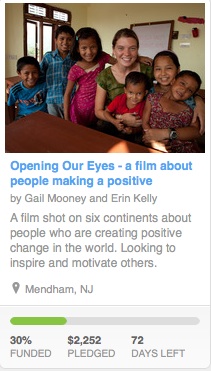
There have been other passion projects since these first two and my head is usually full of ideas that are rumbling around, just waiting for the right time to surface. I am in the midst of a project now, Opening Our Eyes that is perhaps the most ambitious one I’ve ever dreamed up. This past weekend I launched the project on Kickstarter.  Kickstarter is a website that posts creative projects for the purposes of finding funds. It’s a perfect example of crowd funding where one can donate anywhere from $1 to $10,000 to the project of their choice, and in the process make someone’s idea come to life.

I launched Opening Our Eyes on Thursday and within 3 days we reached 30 % of our goal. We still have a long way to go and have another 71 days to get fully funded.  The way Kickstarter works is that if you don’t get funded 100%, then all bets are off and you don’t receive anything.  So, I’m doing my best to do what I like the least and that is make a pitch for pledges.  My intent is to secure enough funds so that I can collaborate with a professional editor and raise the bar on the film that my daughter and I shot this past summer on our 99-day adventure around the world, about people who are making a positive difference in the world.

It’s really a win/win for anyone who chooses to give – even a pledge of $25 will get us closer to our goal and you’ll receive a DVD of our film when it’s finished.  So please check out our project on Kickstarter and pass this link along to others.  Ultimately our goal is to inspire and motivate other change-makers through the power of our film. We know we can do it with everyone’s help and it will make you feel good to give – it always does.

Add to FacebookAdd to DiggAdd to Del.icio.usAdd to StumbleuponAdd to RedditAdd to BlinklistAdd to TwitterAdd to TechnoratiAdd to Yahoo BuzzAdd to Newsvine

My Love/Hate Relationship – Shooting Video With a DSLR

I’ve just spent the last 2 weeks intensely editing my footage shot on my 99-day journey around the world, shooting my passion project, Opening Our Eyes.  I wanted to get a trailer ready for the PhotoCine Expo that I’ll be speaking at this weekend in Los Angeles. I knew that I couldn’t possibly go through all 2900 gigabytes of content (145 hours), let alone cull it down to a finished sample in two weeks time.  So, I took a friend’s advice and decided to focus on only two of my ten subjects that I interviewed and shot b-roll on.

Even with going through only 20 percent of my footage has been a grueling and exhausting two weeks.  But it’s also given me a much better sense of working with and analyzing the files that come out of the Canon 5D Mark II and 7D.

Some of my loves:

  1. I love the picture quality
  2. I absolutely love the picture quality
  3. You can’t beat the picture quality

It’s true, the picture quality is stunning and worth putting up with SOME of the workarounds, depending on what type of job I’m working on.  If I’m shooting a corporate event and I need to record longer than 12-minute intervals, which is the case when someone is giving a talk, then I would opt not to use a DSLR because of the limitations on the duration of a clip.  And, regardless of the type of job I shoot, editing the files from these cameras is tedious because I need to transcode them into a file that will play well in Final Cut Pro.

Some of my hates:

  1. 12 minute clip duration – this really needs to change in the next generation of these hybrids in order to make it a more       workable camera
  2. Audio – Canon really needs to come up with a more professional solution for capturing good audio with the video on           one card.  I have used a JuidedLink pre-amp with a gain disabler on it but it’s still not as good as the audio I get when         I capture it to a separate digital recorder – in my case the Samson H4N Zoom.
  3. Having to transcode all the files into a codec like Apple Pro Res so that I can edit in FCP without stutters, stops and             drop frames.
  4. Stabilization is an issue but a solvable one thanks to rigs from Zacuto. And of course you can always use a tripod – and       really should if the situation warrants.

I’m sure I’ll come to other conclusions as I dig deeper into my content and I’ll share my thoughts as I continue to immerse myself in the post production part of this film.

Add to FacebookAdd to DiggAdd to Del.icio.usAdd to StumbleuponAdd to RedditAdd to BlinklistAdd to TwitterAdd to TechnoratiAdd to Yahoo BuzzAdd to Newsvine

Editing and Workflow for DSLR’s – The First Steps

In the Field
Depending on how you are working in the field and what you are shooting, your workflow and the way you organize and manage your media will vary somewhat. If you have a crew and are shooting a scripted video, then you will probably have a computer and technician on site, downloading media as it is shot, backing it up and checking it for focus.

If you’re working solo or with just one other person, which is how I have been working for the past 3 ½ months on my project, Opening Our Eyes,

Gail at the Kopila Valley Primary School, Surkhet, Nepal

then you don’t have the manpower to work that way. I downloaded all my footage, audio and stills at the end of the day. I rarely had the time or even the battery power on my computer (electricity was scarce at times) to look at what I had shot but I did do spot checks occasionally.

Regardless of how you work in the field,

Children at the Kopila Valley Primary School

it is essential to create redundant backups of all your content. I backed everything up to two portable external hard drives, after downloading the media to my laptop via card readers. There’s a nice software application called ShotPut Pro that lets you make up to 3 copies to different drives at a time, which speeds things up quite a bit. For the most part, I had organized my media by destination and subject with each folder containing the contents of a card. Whenever I shot an interview, I put a fresh card in the camera so that the content was automatically sorted out from the b-roll. Some shooters I’ve talked to who are used to shooting tape, archive each tape or card by making a disk image (DMG) of each which can be mounted on the computer, emulating the original card.


Back in the Editing Suite

The first thing I did when I returned from my 99-day journey, was to make two backups of all my material. After my media was backed up, I started to organize it. Everything had already been separated as far as destination and subject, but I needed to separate the stills from the video and the interviews from the b-roll – if any cards contained both. I also needed to match up the interview video footage with the audio files that had been captured by a separate recording device.

After getting all my media organized and sorted by destination, subject and file type, I renamed the files and added any relevant metadata – copyright and creator info etc. This can be done in Adobe Bridge. You can also look at the video files in Bridge to preview before transcoding them. Another way to preview your video files is by using QuickTime player. Because the files coming out of these hybrid cameras are compressed H.264 files, they do not play smoothly in Final Cut Pro, so they need to be transcoded into a codec like Apple Pro Res, before editing them. This can be done in Apple Compressor which comes with the Final Cut Pro Suite or MPEG Streamclip which is a free application.

You can choose to preview your video files first using Adobe Bridge or QuickTime player or another software tool, and then make a folder of “selects” and transcode just those files before importing them into FCP, or you can transcode everything and then import everything into Final Cut Pro.

After I organized my assets (stills, video and audio), I chose to transcode ALL my video files and import everything into Final Cut Pro. That way, not only could I preview everything smoothly, but I could also start adding information to the clips and organize them into bins within FCP. And with everything transcoded, I won’t have to leave FCP if I wanted to look at content that hadn’t been previously marked “selects”.

Getting to the Fun Part

Organizing, sorting, logging and transcoding is tedious work but it’s essential in order to be able to find things quickly when you need them, when you start laying down your storyline and want to keep focused. There’s nothing worse than having to break your train of thought while you’re editing and have to leave the program to find assets or prep them. Organizing is key – it’s not fun, but a necessary step in the process.

I will continue to slog through this initial process this week, in order to get through some of my content so that I can put together a sample for the PhotoCine News Expo that I’ve been asked to speak at this month. I have way too much material to go through everything, so I’ve decided to tackle the content from two of my subjects, which will make the task more manageable. It will also provide me with the reward of working on the “fun part” of editing by crafting a short story before moving on to daunting task of assembling the entire documentary. Check out this quick sample that I put together within 24 hours after getting off the plane. http://www.vimeo.com/14645594

Little by little things will come together and I’ll keep you posted as I go along.

Add to FacebookAdd to DiggAdd to Del.icio.usAdd to StumbleuponAdd to RedditAdd to BlinklistAdd to TwitterAdd to TechnoratiAdd to Yahoo BuzzAdd to Newsvine

Post-Production – Overcoming Inertia and Getting Started

I returned back to the United States a couple of days ago and before I even did my laundry, I sat down to edit a quick behind-the-scenes interview video clip of my daughter and I discussing the documentary we had just finished shooting, traveling around the world. I was motivated by a deadline where I needed to provide a video clip from the project, right away.

I was fortunate in that we had just shot interviews of each other talking about the making of the film, while the experiences were still fresh in our heads. So it was relatively easy for me to pull a couple of soundbites from the interviews, sync the audio which had been recorded separately and add relevant B-roll.  Within less than 24 hours after stepping off the plane, I had a 5 minute behind-the-scenes short.  Nothing fancy, mind you but in addition to providing an opportunity for the film to get awareness, it forced me to start thinking about the overall structure of the piece.

The hardest part of editing is getting started – figuring out how the story will be told. In my case, I’m facing the daunting task of looking through 3 months of material – interviews, B-roll, still images, and behind-the-scenes footage that I need to figure out how I will put it all together.  There are a dozen different directions where I could take this film in the editing process.  I could choose to make each subject’s story an independent video, with the full length documentary being comprised of them all.  Or I could weave the stories together – structuring the piece more thematically.  Or I could include the mother/daughter aspect in the film and add some interview footage of the two of us talking about the project.

Just in putting together this quick sample, I have forced my mind to start thinking about the next step – crafting the story. My next deadline is to make a trailer for this film that hasn’t even been edited yet. I will be speaking at the PhotoCineNews Expo in LA in a couple of weeks and I’m motivated by this opportunity to present the workings of this project to a live audience.

As it turns out, jumping right into it was the best thing to do.  I overcame the inertia that’s always present, and started focusing on how I was going to tell the story of not only our subjects but the experience itself.

Add to FacebookAdd to DiggAdd to Del.icio.usAdd to StumbleuponAdd to RedditAdd to BlinklistAdd to TwitterAdd to TechnoratiAdd to Yahoo BuzzAdd to Newsvine

My Screw Ups Shooting Video With a DSLR

Today is my last day in Buenos Aires, the final leg on our 99-day journey, shooting our documentary Opening Our Eyes.  This was not the first documentary that I have shot in video, but it was the first where I used HDSLR’s.  Luckily, I was not new to shooting video, thinking in motion or ignorant about capturing good audio.  If I had been, I would have been overwhelmed.  But even with 11 years of video experience – I made my fair share of mistakes.  I got the goods and then some – but I did screw up at times.  I’m feeling generous and confident this morning so I’ll share some of my favorite screw up moments with you.

  • Out of sync – this is so easy to do when you are capturing audio with another device.  For interviews I had two external mics – one lav on the subject and a shotgun mic on a boom stand.  Both were plugged into my Samson H4N Zoom.  I learned the hard way that I should turn the digital recorder on and leave it on.  I had to start and stop the camera because you can only record for 12 minutes at a time.  When I stopped the digital recorder as well – I forgot to start it again a couple of times.  Since audio is not memory intensive – just leave the digital recorder on.  It eats up batteries but it’s better than not getting good audio.
  • Brought a compact tripod – big mistake.  I brought a tripod that would fit in a suitcase so that I would only have one checked piece of luggage. I struggled with it the entire time.  Not tall enough but most importantly wasn’t precise and/or fluid enough in its movements.
  • I got lazy and tried to handhold the camera. Even though I’ve been shooting video for over ten years, instinctively, coming from a still photography background, I tended to think of these cameras in that way and hand held it at times.  I got away with it when I was shooting with a wide lens – but it just didn’t cut it with a focal lens of more than 70mm.
  • I attempted to do some pans and follow focus.  Forget pans with these cameras because of the “jello effect” where vertical lines in the image go askew.  Pans aren’t really good form anyway in video and take up too much screen time.  I also tried to follow focus while filming, focusingon a person or object and then changing the focus to another point in the image. I was not successful because I wasn’t using the right lenses nor was I using a follow focus knob.  To do this properly, you need to have a follow focus ring affixed to the lens and you need to use prime lenses that are meant for cinematography.
  • I made assumptions.  I was a victim of myself – twice.  Once when I hadn’t read the manual for the Zoom digital recorder thoroughly, and changed the batteries without turning off the unit.  Some of my audio files got corrupted. I was lucky in that for those files I can use the camera audio because it will be dialed down and become background audio with a translated voiceover that will be recorded in post.  Had I read the manual – I would have seen the warning. The second time, I was literally in a boat on the Amazon River in Peru and had a major meltdown thinking that my 5D was broken because it wasn’t working in manual mode – which is essential in video.  Unbelievably, my Blackberry was getting a signal so I sent off an email to my partner alerting him to the problem and asked him to have Canon send a replacement to Buenos Aires – my next stop.  I would have to use my 7D in the jungles of Peru and I was happy to have the backup.  To make a long story short, my partner got on the phone with the Canon repair technician, and started relaying to me things to try via email and we finally discovered that the technician had changed some settings in the custom area – that I hadn’t thought to look in after getting the camera back.  I assumed that the technician had set the camera back to factory defaults and I had only reset the settings back to as how I had the camera set up.

So there you have it – my screw-ups revealed.  I’m sure there are more that I’m conveniently forgetting but perhaps I can spare you the pain by learning from my mistakes.  Anyone care to chime in with some of their favorite “off” moments?


Does a Canon 5D Mark II Make You a Cinematographer?

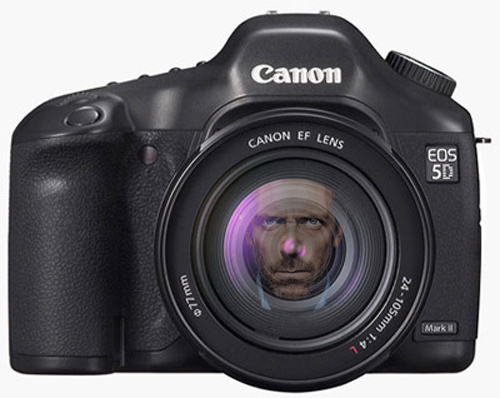
I read somewhere that a recent episode of the TV show “Housewas shot entirely with the Canon 5D Mark II.  A dozen thoughts ran through my head – Who would have thought that a prime time TV show would be shot with a still camera?  – Isn’t it amazing what technology has made possible? With a big production budget, why did they choose this camera? Did they back it up – just in case?

But the biggest thought that ran through my head was that this article oversimplifies the production process and leads you to believe that now just about anyone with a few thousand dollars can become a DP on a prime time TV show. In other words – when talking just about the camera, things get taken out of context.

What about the fact that they most likely had dozens of these hybrid cameras on set, with a crew of hundreds? Or that the sound guys were capturing the audio with tens of thousands of dollars worth of sophisticated equipment.  And then of course there is the post-production aspect where the file from the camera gets tweaked, modified and enhanced by professional colorists.

I think many times still photographers overlook the fact that there is a lot more to a large scale production than just the shoot and the camera.  And most of the time it goes way beyond the capabilities and role of the individual photographer who is used to working in a solo manner as opposed to collaboration.

Don’t get me wrong, there is a big part of me that absolutely loves my 5D and my 7D.  It allows me to deliver a motion product with a stunning visual.  But after shooting motion for 11 years, in addition to my 35 years shooting stills – I know that not only do I need to think differently when I shoot in motion but I also need to collaborate with others to be able to fulfill the needs of the production.

So when you hear that an entire movie was shot with the 5D – think beyond the camera.

Add to FacebookAdd to DiggAdd to Del.icio.usAdd to StumbleuponAdd to RedditAdd to BlinklistAdd to TwitterAdd to TechnoratiAdd to Yahoo BuzzAdd to Newsvine

HDSLR in the Field – Recap of The First 70 Days of 99 Day Project Around the World (Tales of an Insomniac)

I woke up at 4 AM this morning after only a few hours of sleep – my body going through some major jet lag after over 22 hours of flying from Sydney, Australia to New York City via Los Angeles. Yesterday, my full day back, was spent taking care of essentials – like getting my gear to Canon for a full check up and cleaning,

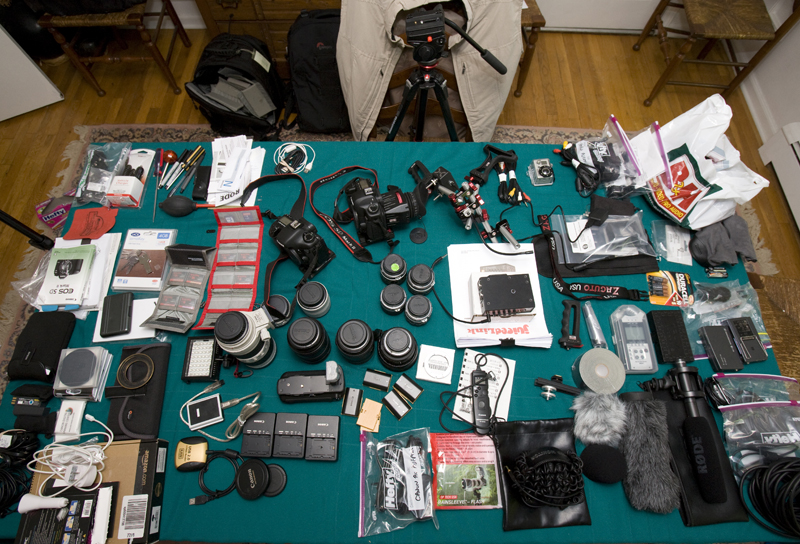
Gear for my first go round.

and a visit to the Apple Genius Bar because my new laptop seems to have a living organism living behind the monitor which shrinks and grows depending on the climate I’m in, and of course taking care of my own personal needs.

As I lay awake in the pre-dawn hours, my mind was spinning with thoughts on what I had to get done before heading to South America on Saturday for the second leg of our documentary Opening Our Eyes. I have only 4 days to recuperate, rest up and gear up for the next leg. The bad part is, I’ve only got 4 days – the good part is, I have those 4 days, and can approach the second leg of this journey with the advantage of having a fresh experience in the field to draw from and make some changes in terms of gear I’m taking on the next leg. More importantly, because my turn around is short, I’m able to stay focused and remain in the mindset of the project.

So as I go over the gear that I brought on my first leg with lessons learned in my head and prepare for the next stint, I’ll share my thoughts with you:

• A good tripod is critical – if you don’t have a decent tripod for video, you can’t get fluid movement, so don’t even try. A locked down shot is better than a jerky shot in motion. I needed to travel light with all the flights that I faced, so I went for a carbon tripod with a fluid head that would fit in a suitcase to eliminate the need for another check on bag. So, for this next leg, I’m seriously thinking of taking my larger tripod because I don’t have as many flights where excess baggage charges could mount up.

• You can never have enough batteries when shooting with a DSLR workflow and by that I mean everything from the camera batteries (and buy lots of them if you can find them for the Canon 5D and 7D) to the expendables for the  DT454 JuicedLink audio preamp, which takes 9 volts to the Samson H4N Zoom which takes AA’s.  By the way, speaking of batteries, don’t make the mistake I made once by not powering the H4N Zoom off before changing the batteries. The manual mentions that by doing so, files can get corrupted. A couple of my audio files did get corrupted – the information was there, but it couldn’t be read.

• I’m leaving my over priced Nikon to Canon lens converter, along with my old Nikon glass at home – I never used them – never felt the need for what I was shooting.

• Can’t wait to edit my timelapse material that I shot using the Canon 7D camera and the Canon timer remote controller TC-80N3.

• I want to get more attachments for my GoPro Hero Cam because there are so many ways to use this camera – it’s amazing and I’m having a ball thinking of all the possibilities in how I can use it. The Hero cam will always be part of my gear kit.

• Always check what audio cords you’ll be needing. I embarrassed to say that I carried around my wireless kit but couldn’t use it with the Zoom because I needed a mini to male XLR cord  and didn’t have it.

• Take 10-20% more memory storage than you think you will need when you’re shooting video. Video is a memory glut. I had been warned by some people that the Lacie Rugged hard drives that I were taking with me, didn’t have a very good track record – but as I write this, my content backups from my Lacie Rugged drives ( over 2000 gigabytes (doubled) ) are transferring to my desktop OWC terabyte drives and seem to be fine so the Lacies did their job. However, they are bulky and I’m going to be getting a couple of 500 gig drives that are more compact. Any suggestions for compact firewire external drives?

• Wish I bought the follow focus with my Zacuto rig. It’s expensive but would have been a real added bonus for visually highlighting one of the beauties of these cameras – the depth of field range that they have.

• Also wish I had a portable dolly like the Indislider but just couldn’t fit it in this trip. As it was, there were some items that I didn’t need to take and will be leaving behind this next leg.

• Wish I brought more mini tools – screwdrivers, allan wrenches etc.

• My Blackberry Tour Verizon phone blew me away. Even when I was in the northern hill tribe villages of Thailand, staying in a bamboo hut without electricity and plumbing – I was able to get my email on my phone! I’m impressed Verizon – I really am. Finding electricity to charge my phone was another matter.

• I could not have survived the 30 flights circling around the world i if I didn’t have my iPod. Thanks Apple.

Feel free to comment and share your thoughts of what has or hasn’t worked for you in the field and you can save me from making potential mistakes as I take on my next leg of this Journey August 7th. We are first headed to the Amazon area of Peru and then down to Buenos Aires, Argentina – again two diverse areas in terms of culture and climate.

Add to FacebookAdd to DiggAdd to Del.icio.usAdd to StumbleuponAdd to RedditAdd to BlinklistAdd to TwitterAdd to TechnoratiAdd to Yahoo BuzzAdd to Newsvine

The Hard Part About Working With DSLR’s

After two solid months of intensive shooting a documentary – shooting both stills and video with two DSLR cameras, the Canon 5D Mark II and 7D, I can honestly say working with these hybrids is not easy. And it certainly isn’t fast, especially if you are working in a small crew as we are.

Yes, the visual is stunning but I can’t help but think how many moments I may have missed that I probably would have gotten if I had been shooting with a video camera. When shooting motion, I have a constant mantra running through my head and that is “shoot and move”. That’s because you need a lot of footage at the end of the day and you need to edit your film. I’m not talking about working with a neatly storyboarded script and a Hollywood crew. I’m talking about working lean and mean and in a somewhat discreet way that is in order when shooting a documentary.

That really hit me last night while shooting on the streets of Sydney, Australia. My subject that I’m focusing on here is Paul Moulds from Oasis, which is a youth support network dealing with homeless street kids. I needed to hit the streets at night and knew that I not only had to be sensitive to the situations that I’d be shooting but also alert to the dangers. I’m positioning myself with a lot of expensive gear in tough neighborhoods where drugs and violence rule.

If ever before I needed to shoot and move and act quickly and keep a third eye out for any lurking danger. No time to stress on the importance of the perfection of the visual. I needed to get in close to the action – make sure my audio was being captured sufficiently and get the story. So even though I can tell you that my visual will be beautiful and lacking “noise” in the blacks – I probably would have gotten better and more meaningful coverage with a video camera.

I’m sure there will be plenty of you who will argue that there are journalists embedded in war zones with these cameras. And of course there’s Vincent LaFloret’s brilliant cinematic night films. But for me, I think there are times when I could have reacted faster with a video camera. And so I think – what’s more important – the resolution or the story?

Add to FacebookAdd to DiggAdd to Del.icio.usAdd to StumbleuponAdd to RedditAdd to BlinklistAdd to TwitterAdd to TechnoratiAdd to Yahoo BuzzAdd to Newsvine

True Convergence With the DSLR Cameras

I read today that mega publishing company Conde Nast “names a new president as company seeks new business model”. http://adage.com/mediaworks/article?article_id=145071

“The historical priorities that have served our company so well — great content, best-in-class magazines, key client relationships – remain the cornerstone of what we do, but we need to move beyond the magazine,” said Mr. Townsend, who remains CEO, in the statement.”

Wow – so one of the biggest publishing companies is realizing that electronic delivery and the internet isn’t an afterthought or an add on to their print pubs.  That would have been unheard of just 2 years ago, but with the proliferation of mobile devices, including the iphone, ipad and other “i” devices, we really are seeing a shift in the way we communicate.

Photographers should definitely take notice of this and understand that they need to think differently themselves. Imagery and workflow that worked in the print world just isn’t going to fly in the world of “i” devices. You need to think and see differently when creating for electronic devices that are capable of showcasing still images, video and sound.  And it’s no longer sufficient to just regurgitate still imagery for the web or pick up a hybrid camera and switch into live mode and shoot video that will adequately convey a message in motion.  It goes beyond the tool – it’s thinking, seeing and anticipating in motion.  After 11 years of shooting motion and over 30 years of shooting still images, my mind seamlessly makes the switch a hundred times a day between thinking and seeing in “moments in time” or “time in motion”. It’s a bit analogous to being fluent in a foreign language when you find yourself thinking in the language rather than needing to do the translations anymore in your head.

Many still shooters who are just beginning to shoot video are so consumed with the technical aspects of the tool, they forget that they need to think and shoot differently when shooting video.  I see a lot of people moving the camera, rather than letting movement take place in front of the camera.  And I see a lot of independent clips shot and then put together in a video timeline, but with no connection to one another or unity in a sequence.  Basically, a slide show of video clips – but not a story sequence.

It takes time to get to the point where you think in motion, especially if you’ve been a still shooter for many years.  My instincts are now that I know when to pick up the right tool – a video camera or a still camera, rather than choose the tool without meaning to the subject that I will be shooting.  I choose the tool that will best communicate the message.

The best advice I can give to still shooters who want to move into video is for them to stop compartmentalizing the two mediums.  Don’t define yourself as a videographer or a still shooter that does sports or weddings or commercial work.  As print gives way to electronic delivery, our clients need to communicate in a different way and we need to be creative in delivering their message and choose the best tool that will do that.  If we can think like that then there is true convergence – not only with our tools but the way we think.

It’s no wonder that publishing houses are hiring shooters with skills entrenched in both mediums.  They need creative’s who think differently – not just in moments in time or time in motion, but a true blend that only a hybrid shooter can deliver.  That’s my best advice that I can offer to people just starting out as photographers or videographers – don’t separate the two – become a hybrid and learn to communicate creatively with the right tool at the right time.

Add to FacebookAdd to DiggAdd to Del.icio.usAdd to StumbleuponAdd to RedditAdd to BlinklistAdd to TwitterAdd to TechnoratiAdd to Yahoo BuzzAdd to Newsvine

HDSLR Video – The Camera is Just the Beginning

Many still shooters make the same mistake when jumping over to video – they only think about the camera and the shoot. When this happens, what quickly follows is mild to severe panic when they realize that audio is even more important than the visual and post-production is video is far different than in stills. On top of that, if you shoot video like a still photographer – you’ll want to kick yourself when you get in the editing room.

The good news is there are plenty of resources when embracing these various skills and learning curves than when I started shooting video over ten years ago.

Here’s a few great sites, listservs and blogs that you should bookmark:

http://asmp.org/tutorials/video-tutorial.html

http://photocinenews.com

http://www.cinema5d.com/index.php

http://phillipbloom.net

newspaperVideo@yahoogroups.com

http://worldwide-studios.com/Worldwide_Studios/Resources.html

So have fun and remember, the more your learn, the more you realize you need to know.

Add to FacebookAdd to DiggAdd to Del.icio.usAdd to StumbleuponAdd to RedditAdd to BlinklistAdd to TwitterAdd to TechnoratiAdd to Yahoo BuzzAdd to Newsvine