Mistakes Still Photographers Make When Shooting Video With a DSLR

  • They don’t understand the importance of audio and don’t use external microphones. Audio is everything in video.
  • They think in “moments in time” and start shooting video too late or stop shooting too soon. You need to let the camera linger longer.
  • They don’t shoot sequences with a beginning, middle and end.
  • They don’t think in “storyboard mode” – You should ask yourself  “How will I get into and out of a shot and what’s next in the story?”
  • They don’t shoot enough B-roll with variations in angles and focal lengths – very important in the editing process.
  • They move the camera instead of letting the motion take place in front of the camera.
  • They turn the camera vertically. There aren’t too many vertical TV sets and monitors.
  • They don’t use a tripod forgetting that video is “time in motion”.  It’s one thing to hold a camera steady for 1/60th of a second and quite another to hold the shot steady for 10 seconds.
  • They don’t consider the frame rate and how that will affect workflow and editing.
  • Aren’t careful keeping their sensors clean from dust.  Retouching video is a lot more involved than spotting still images.
  • They “throw” some video clips in with the still photography job, not putting an added value on them and thus setting a bad precedent with clients.
  • They don’t consider the output and the type of file to be delivered.  There are dozens of formats and codecs in video.  Choose according to your target audience and viewing platform or device.

Add to FacebookAdd to DiggAdd to Del.icio.usAdd to StumbleuponAdd to RedditAdd to BlinklistAdd to TwitterAdd to TechnoratiAdd to Yahoo BuzzAdd to Newsvine

Video News

I came across some interesting things this week, so I am passing them along.

One was the much anticipated announcement of the debut of the Scarlet – a new camera from the same company that makes The Red. There have been a lot of rumors about this camera over the past year and it will be rolled out in 2010.  Check out Philip Bloom’s blog about it. And here’s another post on FreshDV with information about the Scarlet.

If you’re a Sony EX-1 shooter, here’s an interesting tip along with a how-to-video on using the Zacuto Z-finder with that camera. This viewfinder was made for the Canon 5d, but Martijn Schroevers found a clever way to attach it to the LCD of the Sony EX-1.

Next up is yet another new video camera format from Sony – NXCAM. The NXCAM can record 1920 x 1080 images at 24Mbps (50i or 25p), as well as supporting 720/50p and Standard Definition recording.
Very interesting but I wish these camera manufacturers would standardize formats and codecs.

I also came across a very interesting company called Wistia. They allow you to share and host your videos but in addition they offer heatmap tracking which gives you a visual spectrum of how your visitors watch your videos and what attracts them or confuses them.

And to give you an idea of how much web video viewing has exploded, here’s an online channel Expotv where consumers send in video product reviews. No fancy production values but an interesting concept of sharing information that has really caught on.

With all those news items I figured it was about time I changed my header – gone is that template blue – replaced by something more relevant to the blogger.

Add to FacebookAdd to DiggAdd to Del.icio.usAdd to StumbleuponAdd to RedditAdd to BlinklistAdd to TwitterAdd to TechnoratiAdd to Yahoo BuzzAdd to Newsvine

Watching TV Without The Sound – A Lesson In Editing

Every morning I spend an hour on the treadmill while plugged into my iPod listening to music. Sometimes the TV is turned on but with the sound turned off. I have found that just “watching” TV and in particular the commercials, is a great way to learn editing technique. I’m not distracted by the audio so I can better see how the elements get cut together.

Commercials need to get their message out in 15 seconds so the cuts are generally quick and the story needs to be told in an efficient manner. Action-reaction shots, cutaways, close-ups, sequencing – all stand out to my eye because I’m not distracted by the sound. It makes for a great lesson in editing. I notice the visual storyline – what shots are bumped up together, how long they stay on the screen and how they all make up the whole in presenting the message.

Conversely, if I have the TV on in another room (with the audio) and I’m just listening, I can usually get the message without seeing any visuals. That’s why great audio is essential – it drives the story. If people can’t hear something or understand it because the audio is poor quality, the piece fails to engage.

So try it sometime. Watch TV without the sound and notice how the story is told through the visuals and how they are cut together. It will help make you a better editor. And then try watching a video that you create with and without the sound. It’s a great way to see if you are telling the story that you meant to tell.

Add to FacebookAdd to DiggAdd to Del.icio.usAdd to StumbleuponAdd to RedditAdd to BlinklistAdd to TwitterAdd to TechnoratiAdd to Yahoo BuzzAdd to Newsvine

Video Production Tips

Don’t assume anything – ” But I thought ( fill in blank) was going to ( fill in blank).”

Keep an email trail – document everything between you and your client.

Keep a binder – it’s always good to keep a hard copy back up even if everything is recorded electronically.

What to look for on location:
• where the outlets are
• where the windows are and which direction they face
• do the windows have blinds or shades
• what is the ambient lighting in the room
• what kinds of ambient noise is in the location and can it be controlled
• what’s the best-spot for an interview
• where are the bathrooms
• where is the freight elevator
• where is parking
• what is the building contact person’s name and number

When packing for location – don’t leave things behind unless you absolutely have to. It is far better to have it and not need it, than need it and not have it.

Be redundant – bring extra connectors, adapters and cables. If you only bring one – it almost guarantees that one will fail.

Make friends with doormen, secretaries, building electricians, janitors, security guards – you will need these people on locations.

Whenever the call time is – be there early. I’m always the first one on set.

If you don’t schedule a rain day, you will end up needing one.

Always shoot the most important shot first thing of the day.

Maintain an attitude of calm and professionalism – the crew will look to you for the answers. If you show indecisiveness they will go off in all different directions.

Never label a video file or tape “Final” – Whenever you do – there always ends up being another revision.

Always break for lunch – working through lunch guarantees a hungry and cranky crew. Ultimately you won’t get 100% from a hungry crew, thus defeating the time saved.

Slate everything you can. Use the back of the slate for a white balance target. Also attach a printed color bar chart to the slate. This can be helpful in color correction later, matching scenes and/or cameras.

Tape/storage media is cheap. Don’t be afraid to overshoot. That extra b-roll or cut-aways will become valuable assets in post. Get room tone at the same time.

During the mic check for interviews, record a brief statement where each subject states their name, the date and that they are giving permission to be taped. Always make sure your subjects also sign hard copy waivers/releases.

Things always take longer than you think – so estimate more time when scheduling.

In post production back up projects as different versions. Save a clean sub master version without titles and lower-third graphics and where the audio tracks are not mixed down. Most likely you will get a request to change a graphic or a music track and it’s much easier to make those changes on a sub master than to have to redo an entire project.

When a client suddenly takes the project in an unexpected direction, save a version of the project file up to that point.

When editing with a room full of client people – only answer to the guy/gal who signs the checks.

Add to FacebookAdd to DiggAdd to Del.icio.usAdd to StumbleuponAdd to RedditAdd to BlinklistAdd to TwitterAdd to TechnoratiAdd to Yahoo BuzzAdd to Newsvine

More Convergence – DSLR’s + Video = VSLR

It seems like this has been the year of the video capable DSLR or VSLR. Not only are manufacturers continuing to roll out new models but third party companies have made a big business out of selling attachments or add-ons for these cameras.

Dabblers as well as professional still photographers have gotten into video because the entry level has become easier and more affordable with the advent of these cameras. While traditional news crews haven’t embraced the new hybrid cameras yet, filmmakers have created a cult around them. I must confess that although technically I have had my hands on these cameras, I have not done any test runs using them in the field.  But it is on my list of things to do.

What’s Out There Now

The Nikon D90 shooting 720p was the first DSLR camera to shoot video in HD.  Canon followed with its impressive 5D Mark II which raised the bar by shooting full frame 1080p with external mic input and recently rolled theyout the Canon 7D with variable frame rates for under $2000!

The most attractive features of these hybrid cameras besides the price, is the ability to change lenses, have controllable depth of field and large sensors that work phenomenally in low light situations. However there are limitations that traditional video cameras that come at a higher price don’t have.  Camera stability is one problem due to how the shooter needs to hold the camera because they are designed to shoot in video mode with the mirror up. Since the camera operator must see and focus using the LCD monitor instead of steadying their eye up against the viewfinder, it’s harder to stabilize the camera when hand holding it. Audio capture is very basic as well and must be supplemented in some way.

Third Party Options

Because of these limitations, third party manufacturers have gotten in the game by designing add-ons. Zacuto

zfinderfeature
Z-Finder

has come up with a few interesting items.  One item is the Z-Finder DSLR Viewfinder, which is a device that fits over a 3” LCD and provides magnification for better focusing. It runs around $400.  Hoodman lpp3.0(front)provides a lower cost version called the Hoodloupe without the same optics but at a quarter of the cost.

An added benefit to using these viewfinders is that it provides another contact point with the shooter’s body and therefore provides more stability.  There are also camera support systems available that help remedy the need for better stability in “run and gun”

RapidfireFeaturepic
Rapid Fire

situations where the shooter can’t use a tripod.  Zacuto makes two stabilization devices, the DSLR Rapid Fire and the Quick Draw each designed with a different type of shooting situation in mind. In addition a Cavision has come up with a shoulder mount device the  RS5DM2SET-S.

Package for 5DII-8
Cavision shoulder mount

As far as audio is concerned, if you want to move beyond a supplemental external mic that’s plugged into the camera and use a more professional audio solution you’ll need balanced XLR inputs which will also enable you to use multiple external mics off the camera. Beachtek makes the DXA-5D for around $375 and juiceLink has come up with the juicedLink CX231 for about $300.

H4n_slant-web
Samson H4n

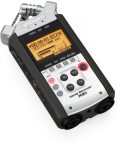
Or you can capture your audio with a stand-alone recorder like the Samson Zoom H4n, also around $300 and sync it later in post.

Regardless of how you ultimately “trick out” your VSLR (video single lens reflex)  you can be sure that there will continually be newer models and solutions as technology keeps moving forward.   Pro Video Coalition puts out a great newsletter online keeping us abreast of the latest tools.  Check out their DSLR Shootout where they test these hybrids and adaptors. Take Dirck Halstead’s Platypus Workshop now incorporating the new DSLR’s in the program. And become a Facebook fan of From Still to Motion for ongoing information and updates.  It’s an exciting time with loads of possibilities.

Add to FacebookAdd to DiggAdd to Del.icio.usAdd to StumbleuponAdd to RedditAdd to BlinklistAdd to TwitterAdd to TechnoratiAdd to Yahoo BuzzAdd to Newsvine

Tools of Change and New Distribution

Up early again, my mind restless and spinning with ideas, thoughts and reflections on last week’s Photo Expo in New York City.  Ironically this year’s Expo didn’t really reveal anything “new” for me in the way of new toys and tools of the trade.  What was new was the obvious absence of Adobe on the exhibitor floor – a sign of the economic times?  Or is it  a sign of how the photographic business is shifting – from professional to prosumer?

While in NYC I took time to see Robert Frank’s exhibition “The Americans” at the MET.  His beautiful images have stayed in my head and no doubt will provoke me to jump-start one of the many projects that continue to bubble to the surface in my mind.  But there was one thing I read in context of the exhibition and that was a statement made about the camera being a “tool of change” during Frank’s time. I started thinking about that and realize that the camera, whether it be a still camera or a motion camera is still a “tool of change”.  James Natchwey’s images are powerful examples of that.

What is radically different today is our means of distribution – of getting our imagery seen.  No tool has the power to make a difference or a change if what it creates is never seen.  I started thinking about the demise of newspapers and print in general and I was dismayed about the future Temple of Horus, Edfu, Egyptand the still photos that may never be seen.

With the Internet and global distribution, the playing field has been leveled and democratized and anyone can share anything they create with the rest of the world – right?  Maybe not – because ultimately the web is controlled.  It’s controlled by what search engines find and how information is ranked. Listen to Eric Schmidt, Google’s CEO talk about the Internet of the future.  Even Facebook now is deciding which friends will see our news feed.  That default can be changed of course – but you have to be aware of it to change it.  How many of us are aware? And I mean that in the broadest sense, meaning aware of what and how our information is delivered.

All the “free” content we get these days over the web excites us all.  It’s great – but even free comes at a price.  I can only hope that future generations will understand the underlying cost of  “free content” and be aware of who is controlling distribution in this new paradigm.

Converging Technologies and Photo Plus Expo 2009

I’ve been attending the Photo Expo for as long as I can remember, back when it used to be at the old Convention Center at Columbus Circle.  It changed over the years, growing in size, moving to Javits and now shrinking, taking up ½ the floor space it used to.  Times SquareThat could be yet another sign of the economy, or how the photographic industry has changed over the years – or both.
This year is the first year there will be a Video Pavilion, where manufacturers can showcase their products and attendees can get a glimpse of how the converging industries of photography and video continue to change the paradigm of how we deliver our visual message.

Another profound change on the floor this year is the absence of the Adobe booth.  I can’t remember a time when Adobe has not been an exhibitor at Photo Expo.  Has the economy played a part in that – or is it another sign of changing times in the photography business?

It will be interesting this year to observe who is exhibiting and what the new “cool” tools are?  Like last year when Canon displayed their first hybrid camera the 5D – a still camera that also shoots video – their booth, along with Nikon will be the “main attraction”. Video continues to be the hot topic.

Gone are the manufacturers of lab equipment, along with the last vestiges of film. Gone are Apple and Adobe – maybe next year?  Or will next year look more like NAB”s (National Association of Broadcasters) show in Las Vegas as we continue to move from ink and print to electronic delivery?

Making Still Images Move

Burlesque
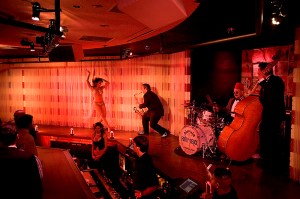
Burlesque club, Las Vegas (click image for motion sample)

I’m often asked how to prep still images and how to make them move in a multimedia/video piece.  My initial response to this question is to reply with a series of questions – “Why do you want to make your images move?” “What’s your motivation? What do you want to communicate to the viewer?” “Do you need sound and movement to better tell your story?”

I’m not one to do things just because I can – I need a reason.  For me a still image is an entity in and of itself – a moment in time to be studied and contemplated.  When I present still images in a multimedia presentation – those “moments in time” become part of a greater whole.  That new entity becomes a different visual message with sound and motion becoming the underlying spine of the piece.  Added information that’s needed to convey that particular story. The still images become sequences and the sound and movement of the piece create the “feel” and “pace” of the whole.

As far as the practical aspects of creating a multimedia piece – the first step is to choose an editing software that works into your workflow.  I use Final Cut Pro Studio on a Mac.  I use Final Cut Pro (within the suite)  if I don’t have a lot of images to edit but lately I’ve been using Motion (also included in the Studio suite)  – because it’s easy – once you know it. You don’t need the depth of these software applications  to create a simple multimedia piece.  There are plenty of software applications to choose from  – iMovie and FCP Express in the Apple family, Adobe Premiere (cross platformed if using an Intel Mac) , Sony Vegas for PC’s  and simpler programs like Soundslides or Audacity.

There are many tutorials on this subject – check out Ken Stone or Lynda.com – both great places to learn.  In the meantime I will share my recipe for how I size and prep my images for multimedia presentations.  Like anything else, there are hundreds  of ways to get to the same end – but these are my suggestions that I find work best.  Another note – I use large image sizes so that I when I bring the images into my editing timeline – I have room to zoom into the images without having to  enlarge them beyond 100% in the video application.

My sizing/prepping suggestions for still images:

RGB color mode

Srgb color profile for SD (standard def)

HDTV (Re.709) color profile for HD (hi def)

Tiff, PSD or PNG – better than Jpeg

Don’t over sharpen image – it will jitter on screen

Use de-interlace filter for web videos – but this is something you need to test – I don’t always like the effect this filter has.

Sizing – I always upsize my images 2.5 x needed for video timeline  if I will be moving them “Ken Burns” style. Below are different specs for HD and SD and different aspect ratios:

Standard Def – DV NTSC 4:3 – 1800x1350x72 (pixels)(res)

Standard Def – NTSC 16:9 – 2132x1200x72 (pixels)(res)

HD – 720p – 3200x1800x72 (pixels)(res)

HD – 1080i – 4800x2700x72 (pixels)(res)

It’s really never been easier to prep still images in an application like Photoshop because there are lots of built in presets. I always prep all my assets and import them into my editing software before I even begin to edit.  That way I don’t need to depart from the edit and lose a train of thought whenever I need to add a still image or other graphic.

Have fun – and when you do decide to move an image – ask yourself why first?

Finding Your Passion

How does one find their passion?  How does one even define the word – passion?  The dictionary gives a few definitions. I’ll cite two:
– “intense or overpowering emotion such as love, joy, hatred, or anger.”
– “the object of somebody’s intense interest or enthusiasm”

Passion isn’t something you can teach someone – you just have to have it inside of yourself.  If you’re passionate about something – you just know.  I’m a photographer and a filmmaker .  But my passion is “telling the story” and I use my craft as a means to that end.  I’m interested in the human story and the cultural context that gives birth to those stories.

My insatiable desire to seek out and explore the human story has led me down many wonderful paths in my life. One of those paths led me to shoot a personal multimedia project on The Delta Blues Musicians.  My goal was to shoot environmental still portraits– as well as shoot video interviews of them .  I met my goal – at least in terms of creating an exhibition of still images and a short documentary – but I’ve never thought of this project as really being finished.  And that’s because I’m so passionate about the subject – “the blues”.

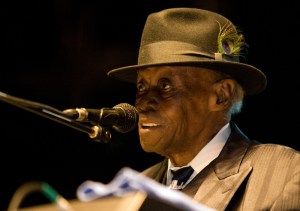
This past Friday, I headed down to Mississippi for Pinetop Perkins homecoming.  PinetopPinetop Perkins is a legendary boogie woogie piano player in the blues world.  He’s 96 years old and still going strong.  He is living proof of a man who is “living his passion.  I’ve become friends with Pinetop’s manager over the years and yesterday we got together over lunch to catch up on what was going on in our lives. I hadn’t been to the Delta for a few years and she was giving me the latest news on some of the musicians that I had interviewed for my film.  Four have since died – Little Milton, Robert Lockwood Jr., Ike Turner and most recently Sam Carr.

Pinetop’s manager is a very interesting woman who used to be an Anthropology professor at University of California at Berkeley.  She taught interview techniques as part of her ethnology classes.  When I had originally called her up to request an interview with Pinetop – she turned me down.  But not being one to take my first no – I asked her to check out my website and I also sent her a portrait I had taken of Sam Carr.  When she saw the photo I had taken of Sam – she changed her mind – she gave me my time with Pinetop.  She said that after she saw the portrait I took of Sam – she knew that  I understood “cultural context”

Yesterday at lunch she paid me another high compliment.  She told me that while she couldn’t quite dissect my “interview technique” (and she kind of rolled her eyes as she said it – because at times my techniques are quite comical) – she said that people just seem to be comfortable with me and  because of that they wanted to talk.  She also told me that I’ve been the only one to get a smile out of Robert Lockwood Jr. in an interview – but that’s another story.  Those comments were rewards in themselves for the efforts I’ve made on this project over the years – but there have been so many more.  Many rewards – all because of my passion for “the blues”.

Later that evening I got a chance to see Pinetop perform again.  I was backstage at the main festival stage – it was unusually chilly and I had a blanket with me.  Pinetop was sitting in the wings and I gave him my blanket as he waited for his cue.  He seemed so small and fragile.  When he got up to walk on stage and take his place at his keyboard before the crowd – he came alive.  And when he played his first note – I caught “it” in his eyes – a passion for his music and more than that – a passion to play for “his people”.  He didn’t want to leave last night – he played another song for “his people” and raised his arms in joy as the crowd embraced him.  It was a moment I’ll never forget.

Why Shoot Video Instead of Stills

Video seems to be the “hot” topic these days.  There’s nothing really new about video – it’s been around for quite some time.  So why do we see and hear it everywhere? You Tube gets one billion hits a day!  Perhaps the short, simple answer is because society interacts and communicates more and more via the web through social media sites.  And because of broadband capabilities – we “can” watch videos without the painful experience of watching stuttering video while it downloads.

So as the economy stays soft and still photographers try to stay afloat and camera manufacturers incorporate video capabilities  into still cameras – there seems to be more and more photographers who feel the need to start shooting video.  I’m a big advocate of video – but for all the right reasons and those reasons are different for each and everyone of us.  But – you must have a reason why to shoot video from a story point of view.  Because visual communication should be all about telling the story or relaying a message.

I used to shoot a lot of stories for the National Geographic Traveler – mostly city stories.  I spent quite a bit of my time – observing life and waiting for the “moments”.  I’d also spend a lot of time talking to people and listening to their stories.  I stored a lot of those conversations in my head over the years but because I am a photographer – my images were published – but not those conversations. So in a sense there was a large part of my experience that was never shared.

When I started shooting video projects, along with it came the need to do interviews. A big part of many of my videos are interviews that drive the narrative of the story.   Interviewing someone on video can be a powerful thing. That is truly one of the most powerful aspects of video  and the reason “why” I choose that tool when I do.  When I sit down and speak with someone  face to face – I get the type of experience and interview that one can only get in person.  I pick up on all the nuances – the body language – of the subject.  When I really care about my subject – the connection becomes that much stronger – the questions are answered not only with words but with the body and the eyes and everything in between.  And that shows – on camera and can drive the story in a meaningful way.

So when I need to tell someone’s story and that person tells their story not solely through their words but with every inflection of their voice and body – then video is my tool of choice.  That choice is made because it makes the story stronger.  Not just because I “can” because my camera has video capabilities. Choose your tool wisely.  I’d love to hear how and why others decide on which tool to choose. There’s so many reasons.