More Convergence – DSLR’s + Video = VSLR

It seems like this has been the year of the video capable DSLR or VSLR. Not only are manufacturers continuing to roll out new models but third party companies have made a big business out of selling attachments or add-ons for these cameras.

Dabblers as well as professional still photographers have gotten into video because the entry level has become easier and more affordable with the advent of these cameras. While traditional news crews haven’t embraced the new hybrid cameras yet, filmmakers have created a cult around them. I must confess that although technically I have had my hands on these cameras, I have not done any test runs using them in the field.  But it is on my list of things to do.

What’s Out There Now

The Nikon D90 shooting 720p was the first DSLR camera to shoot video in HD.  Canon followed with its impressive 5D Mark II which raised the bar by shooting full frame 1080p with external mic input and recently rolled theyout the Canon 7D with variable frame rates for under $2000!

The most attractive features of these hybrid cameras besides the price, is the ability to change lenses, have controllable depth of field and large sensors that work phenomenally in low light situations. However there are limitations that traditional video cameras that come at a higher price don’t have.  Camera stability is one problem due to how the shooter needs to hold the camera because they are designed to shoot in video mode with the mirror up. Since the camera operator must see and focus using the LCD monitor instead of steadying their eye up against the viewfinder, it’s harder to stabilize the camera when hand holding it. Audio capture is very basic as well and must be supplemented in some way.

Third Party Options

Because of these limitations, third party manufacturers have gotten in the game by designing add-ons. Zacuto

zfinderfeature
Z-Finder

has come up with a few interesting items.  One item is the Z-Finder DSLR Viewfinder, which is a device that fits over a 3” LCD and provides magnification for better focusing. It runs around $400.  Hoodman lpp3.0(front)provides a lower cost version called the Hoodloupe without the same optics but at a quarter of the cost.

An added benefit to using these viewfinders is that it provides another contact point with the shooter’s body and therefore provides more stability.  There are also camera support systems available that help remedy the need for better stability in “run and gun”

RapidfireFeaturepic
Rapid Fire

situations where the shooter can’t use a tripod.  Zacuto makes two stabilization devices, the DSLR Rapid Fire and the Quick Draw each designed with a different type of shooting situation in mind. In addition a Cavision has come up with a shoulder mount device the  RS5DM2SET-S.

Package for 5DII-8
Cavision shoulder mount

As far as audio is concerned, if you want to move beyond a supplemental external mic that’s plugged into the camera and use a more professional audio solution you’ll need balanced XLR inputs which will also enable you to use multiple external mics off the camera. Beachtek makes the DXA-5D for around $375 and juiceLink has come up with the juicedLink CX231 for about $300.
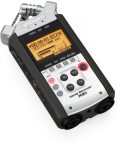
H4n_slant-web
Samson H4n

Or you can capture your audio with a stand-alone recorder like the Samson Zoom H4n, also around $300 and sync it later in post.

Regardless of how you ultimately “trick out” your VSLR (video single lens reflex)  you can be sure that there will continually be newer models and solutions as technology keeps moving forward.   Pro Video Coalition puts out a great newsletter online keeping us abreast of the latest tools.  Check out their DSLR Shootout where they test these hybrids and adaptors. Take Dirck Halstead’s Platypus Workshop now incorporating the new DSLR’s in the program. And become a Facebook fan of From Still to Motion for ongoing information and updates.  It’s an exciting time with loads of possibilities.

Add to FacebookAdd to DiggAdd to Del.icio.usAdd to StumbleuponAdd to RedditAdd to BlinklistAdd to TwitterAdd to TechnoratiAdd to Yahoo BuzzAdd to Newsvine

Tools of Change and New Distribution

Up early again, my mind restless and spinning with ideas, thoughts and reflections on last week’s Photo Expo in New York City.  Ironically this year’s Expo didn’t really reveal anything “new” for me in the way of new toys and tools of the trade.  What was new was the obvious absence of Adobe on the exhibitor floor – a sign of the economic times?  Or is it  a sign of how the photographic business is shifting – from professional to prosumer?

While in NYC I took time to see Robert Frank’s exhibition “The Americans” at the MET.  His beautiful images have stayed in my head and no doubt will provoke me to jump-start one of the many projects that continue to bubble to the surface in my mind.  But there was one thing I read in context of the exhibition and that was a statement made about the camera being a “tool of change” during Frank’s time. I started thinking about that and realize that the camera, whether it be a still camera or a motion camera is still a “tool of change”.  James Natchwey’s images are powerful examples of that.

What is radically different today is our means of distribution – of getting our imagery seen.  No tool has the power to make a difference or a change if what it creates is never seen.  I started thinking about the demise of newspapers and print in general and I was dismayed about the future Temple of Horus, Edfu, Egyptand the still photos that may never be seen.
With the Internet and global distribution, the playing field has been leveled and democratized and anyone can share anything they create with the rest of the world – right?  Maybe not – because ultimately the web is controlled.  It’s controlled by what search engines find and how information is ranked. Listen to Eric Schmidt, Google’s CEO talk about the Internet of the future.  Even Facebook now is deciding which friends will see our news feed.  That default can be changed of course – but you have to be aware of it to change it.  How many of us are aware? And I mean that in the broadest sense, meaning aware of what and how our information is delivered.

All the “free” content we get these days over the web excites us all.  It’s great – but even free comes at a price.  I can only hope that future generations will understand the underlying cost of  “free content” and be aware of who is controlling distribution in this new paradigm.

Technology News – New Video Cameras Announced

Anyone who reads my blog knows that I’m not one to get overly infatuated with the “tools of the trade” – but this week a few new cameras and upgrades were announced.

Sony announced two new cameras the PMW-EX1R – a revision of the EX-1 and the PMW-350 with a 2/3” chip. Redesigned viewfinders on both cameras make them attractive upgrades but there are many other added features as well.

Canon announced that it is currently developing a firmware for their hybrid camera – the EOS 5D Mark II enabling the camera to record at 24fps, obviously responding from user feedback.

Canon also announced their latest still camera (that also shoots video) the EOS 1D Mark IV.  The sensor however, is a non full frame but the autofocus system has been totally revamped.

All for now as I am headed into New York for Photo Plus Expo, where I’m sure to see more new toys.  More later.

The Business of Video

The “business” of video encompasses a lot of things –  your marketing strategy, your cost of doing business, your skill set needed to survive in business, your management of employees or outside contractors and paperwork.  For now I’ll speak to paperwork and how critical it is in communicating with clients.

A paperwork trail starts with an estimate for a job and I don’t take the process of estimating lightly.  I try to get as much information that I can when a client comes to me and asks me to bid on a job – or asks me  to provide an estimate for a job I’ve already been hired to do.  I keep a database of past SOW’s (Statement of Work) to use as references. While every job is different, I use these archived SOW’s as a starting point.

In addition to estimating the costs of crew, equipment, location needs, pre-production and post-production, I  clearly state terms as well as a schedule for post-production – including client response time and completion dates.

Terms – Here is where I state rights and  “usage” of the finished product – where will it be used and for how long.  I also spell out payment terms, cancellation fees as well as provide an accurate description of exactly what I’m going to deliver.  For instance:

  • 10-minute video to be delivered on DVD and compressed files for the web.
  • One day shoot on location at………….includes 2 interviews and b-roll
  • Post production – edit will include x amount of still images – sized and digitally provided by client – logos  provided by client– stock photos and/or footage – narrative (voiceover) track and music.
  • Payment – one third upon signed SOW – one third after shoot – and balance due upon delivery of final product.
  • Cancellation terms and fees
  • Change fees
  • How many edit revisions are included and the additional hourly editing costs if more revisions are needed.

Schedule – This is extremely important in video production – a schedule sign off by the client that stipulates delivery dates for each part of the process. The reason this is critical is that if the client delays things on their end – it’s clearly understood that the rest of the schedule gets extended in terms of deadline dates.  Otherwise if your client needs their boss to approve things  and their boss has an unexpected out of town trip come up – thus delaying the process – you won’t be left with half the time you need to deliver the final product.  Example of post production schedule:

  • Aug. 31 –  Script approved by client
  • Sept. 1  –   Casting reel delivered to client
  • Sept. 7  –   Talent decisions made by client
  • Sept. 20  – Shoot date
  • Sept. 25  – Voiceover recorded
  • Sept. 26  – All logos, graphics and still images provided by client
  • Oct. 5 –     Rough Cut delivered to client for review
  • Oct. 12 –   Any edit changes noted by client and communicated to production house.
  • Oct. 19 –   Final cut delivered.

Lastly here’s a link to AICP (Association of Independent Commercial Producers) with examples of bid forms and contracts that are helpful in terms of bringing to mind all the things that should be covered in your SOW.

The Smell of Fixer in the Morning

This is a bit off topic but was prompted by my trip yesterday to Randolph Community College in Asheboro, NC.  I was giving a seminar for ASMP  “Converging Media – Adding Video to Your Skill Set”.  After setting up for my presentation I was given a tour of the school – a wonderful facility.  After going through their impressive computer labs and studios – I asked my guide and Program Head, Chuck Egerton,  if the school still had dark rooms.  He smiled and said “I’ll show you”

The second I entered the darkroom – and got that familiar taste of fixer in my mouth – I was immediately transplanted back to Brooks Institute in Santa Barbara where I had studied 34 years ago.  It’s hard to believe it’s been 34 years but when I walked into that darkroom and saw the students making their prints – it seemed like I was back at school.

A lot of memories flashed through my mind that hadn’t surfaced in years.  Being the only woman in my class – and one of six in the entire school.  Always being in a rush because I was working full time at night and going to classes and executing my assignments during the day.  Racing from the Riviera campus to the Montecito campus at break neck speeds around the curves in my big old orange Dodge van.  And most of all living in beautiful sunny Southern California, yet spending a lot of my time – in the dark.

The changes in photography have been profound since then and I’d probably have to say that as much as I learned at Brooks – I’ve learned a lot more since – out of necessity because of technology.  I love learning more now than I ever did in my younger days.  History gives interesting perspectives and when something jogs my memory and I remember my own history – I’m amazed by how much things have changed.  Seems like only yesterday.

Video, Editing and Chroma Key (green screen)

Even though I started shooting and editing video some 10 years ago – I can honestly say that I still have a lot to learn.  The “learning” part of my craft has been non-stop.  I continue to learn as technology constantly pushes us all in that direction.  But I love it.  I love raising my bar every chance I get.  And these days, even though the learning curve may be steep in certain aspects of video production – it’s also a lot easier to access information and help than it was 10 years ago.  Again – thanks to the volumes of information online – at the click of a button.

I love the editing process of video production because this is really where I craft the story.  I can get totally lost in the story and how I can mold that in whatever direction I choose in the edit room.  But I’m not a professional editor and I have the utmost respect for what a pro brings to this part of the process.  So I lay down my rough cut – to get the storyline down and then hand it off to a pro to take it to the next level.

I’m editing a recent shoot that was quite challenging on all accounts.  A lot of what was shot, was shot on “green screen”. Green screen or “chroma key” is the process of removing a background color, – green for video – blue for film – so that the “subject” or “object” can be placed into another background in post. There is a lot of info out there on green screens so I won’t go into it in depth, but the biggest thing you need to know is how to properly shoot green screen so you won’t have a major melt down in post – or won’t have to spend a fortune for an editor to clean up your mistakes.  ResidentialExterior_NewTech

A couple of tips for shooting on green screen:

•    Turn off edge enhancements or sharpening in Picture Profiles – in camera menu
•    Create a new Green screen Picture Profile w/o sharpening
•    Keep subject lighting off background
•    Keep background lighting off subject
•    Keep green screen as far away from subject as possible
•    Minimize seams, wrinkles, folds
•    Even out your green screen lighting within 1/2 stop
•    Brightness level should be about one stop under key light on your subject.
•    Light your subject complimentary to your inserted background
•    Don’t use dimmers – changes color temp toward red – not good for keying
•    Create an edge or separation light – keep it subtle!!
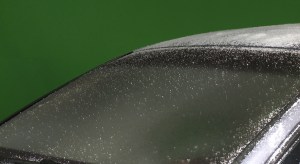
•    Watch out for reflective objects and surfaces (CAR SURFACE) that can pick up green screen

So if you’ve successfully shot a good clean composition as described above – then of course you need to put things together in post. Windshield OutsideThis used to be a tedious process and would involve a lot of work in post production.  But thanks to some incredible plug-ins available – you can get a pretty amazing “key” without a lot of hours in the editing room.
I found a product that really helped me out.  DVmatte Blast and DVmatte Pro from www.dvgarage.com. These plug-ins will work inside Final Cut Pro as well as Motion.  I chose to work within Final Cut.  I was amazed by not only how easy it was to use but by the price as well.  DVmatte Blast was $99 but I purchased DVmatte Pro for $199 because it gave me more “tweaking” options.  And as always whenever I need to learn a new piece of software – I went to http://www.lynda.com.  So instead of laboring with greens screens in post for an entire day – I got the job done in a matter of a couple of hours – and I had a lot of compositions to make.

I love to learn but I also like to lead some sort of a personal life – away from the computer.  And these days – thanks to a little help from my “friends” I’m achieving a nice balance.

Video Production in the Deep Freeze

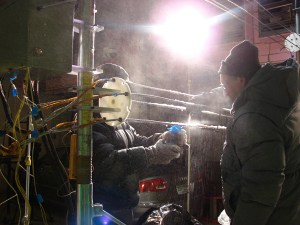
I just spent the last week in New Hampshire working on an “industrial” video for a new business venture that will be licensing an amazing new “ice” technology. It was perhaps the most challenging job that I’ve had in many years – especially from a technical level.  One day we worked from 8AM – midnight in a “cold room” at the US Army Cold Regions Research and Engineering Laboratory (CRREL) shooting “ice” experiments.  We were dealing with extremes on all levels.  The Russian scientists scientists– brilliant electrical engineers – were pushing their own boundaries as they ran tests with ice on power lines and automobiles and as much as I was witnessing this work in sub zero temperatures – it was amazing to watch them work. If I hadn’t been so busy with my own technical challenges – I would have loved to just observe them and try to get into their head.  scientists2You could almost see their brains working – just by watching their faces.  Then to see the triumph in their eyes when their experiments worked – what a thrill.  I now need to go to Russia.
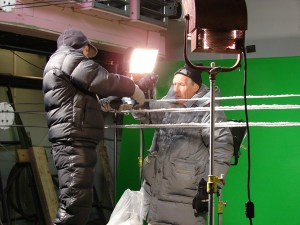
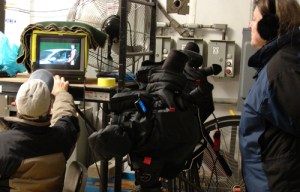
My partner Tom had done a great job with pre-production, making sure we would be fully prepared to work and have our equipment work in these extreme cold temperatures.  We put the cameras into “polar mittens” mittens to keep them warm and swapped out the warm packs as we shot late into the night.  We had to erect large “green screens” so that in post I can insert winter scenes.  Problem was our green screens were large pieces of fabric and the chill blowers were blowing them all over the place.  We tried to anchor them but in the end we had to turn the blowers off during the shoot. Thank goodness we didn’t need usable audio. We used hot lights and a lot of them.  Used every extension cord we had and every outlet in the room – 10,000 watts.  Ironic huh – hot lights in a “cold room”.  Because of that we had to leave the lights on the entire time because we knew that when we turned them off – we’d get condensation on the bulbs.  When we finally did break the set down at midnight – we turned the lights off, let them cool a bit and put garbage bags over them so that as they warmed we wouldn’t get moisture on them.  Didn’t really work too well though.  setWe did the same thing with the cameras and that worked great.  Because we had the lights on all day and were using long extension cords – one cord got over heated and actually melted and fused to itself.  The Russian electrical engineer noticed it – Thank God – or we would have burned down the building.
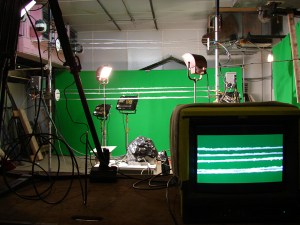

We shot an interview with another brilliant Russian scientist who was passionate about ice and also shot b-roll of all kinds of things, the campus (we were at Dartmouth), labs, refrigerators, icemakers and the computers in the cad labs. All in all things went quite well considering the adverse conditions we were working in and pushing our equipment and ourselves to the limit. One HUGE bummer was that the assistant that Tom had hired  – who came recommended from another photographer – quit after the first day.  We got through the shoot though – but had to muster up everything we had within us.  The client wrote today to say he was extremely pleased with the roughs he had seen and impressed with our fortitude on the shoot given the situation.

Now on to phase two – to record the narrative, research a ton of stock footage and photos, pick the music, work with the motion graphics team and put it all together.  As much as the postproduction inevitably involves a lot of work and long hours – I love this part.  This is where the story comes together and is really crafted.  And that’s always the best part for me.

Photos ©Sheldon Tefft

Letting Go of What We Know

There’s so much angst these days in the “photography” community and not just the photo community but everywhere.  People are almost paralyzed from fear – fear of the future.

I don’t think we ever get anywhere if we let “fear” take over our lives.  Certainly not if we live and work in a creative field.  The fear seems to creep up when what we are “used to” is no longer there.  Anyone who works for newspapers can relate to that statement.  But we can’t change “what is”. I don’t look “back” often but when I do – I do it to get perspective.  And when “fear” of the future manifests itself so strongly – to quote Jackson Browne “it seems it’s easier sometimes to change the past”.

We all know we can’t change the past – so why do we dwell on it?  Because it’s really scary to face a future where all the rules have changed.  Technology has forever changed the game.  We can moan that our clients don’t respect us and that they just want work that is “good enough” and worse yet – coming to terms with the fact that maybe, just maybe “good enough” is good enough for their needs. As we communicate visually over electronic platforms like the “web”, do we need an image file that is 8000 pixels in its longest dimension with 300 res – like we did for those glossy brochures?

On the other side of the table is that nagging notion that we all must learn to shoot “motion” and “video” and we’re intimidated by it because it’s not what we know.  I guess I’m an oddball because I’ve never really been too intimidated by what I don’t know – I’m actually drawn to it and excited by it.  Sometimes I rush to the unknown almost carelessly without even considering the consequences. And there’s always consequences – many times negative ones – or ones that may seem negative at the time.  But every now and then – if you just “let go” of holding on to what may not be working anymore in your life – you’ll find that you’ve opened yourself up to wonderful possibilities.  I keep my eye on those possibilities and it’s so much better than holding onto the past.

Codecs and Confusion

It seems like every month manufacturers roll out new video cameras along with more new “proprietary” codecs.  With over 18 standard formats and hundreds of variations it has made “workflow” for digital video very complicated. We’ve got everything from DV, HDV, DVCPRO HD, XDCAM EX , Cinealta to The RED.  It makes multi camera shoots – a potential nightmare with different cameras shooting different codecs. And on top of that each camera offers a variety of frame sizes and rates to shoot in.  Ultimately, there are no guaranteed workflows anymore.

Here’s an interesting round table discussion of various experts in the field  – Ken Stone, Michael Horton, Philip Hodgetts and Andrew Balis – discussing codecs and standards.  http://tiny.cc/nRGOV

So how can we take some of the confusion out of all this and determine the proper camera and workflow for ourselves?  To answer this question it’s best to determine “where you want to go” and “then you’ll know where to start”.  What do you need to deliver?  Is it a video for the web,broadcast or the big screen?

Many times choice of camera and workflow is driven by budget.  A lower end camera producing a codec with less resolution will be “good enough” for a web video. Will the “good enough” attitude being driven by budgets lower our expectations for quality?  Some feel that it’s changing our aesthetic judgment. I don’t think the high end will go away.  In fact advances in technology has enabled more people to make a living doing what they love because there are more choices within their budget.

One thing’s for sure – technology is a double-edged sword and it will continue to change our lives.  I just wish that soon there would be a coordinated effort amongst the camera manufacturers to standardize for the sake of workflow.

Field of Dreams (and Video)

I love baseball – not sure why.  Maybe it’s just the idea of baseball that I love.  It’s traditional, American and a nostalgic reminder of summers past – at least for me.  I’m also a Cubs fan and I know what it’s like to be the eternal underdog, yet forever hopeful.  And that’s me – forever hopeful and optimistic. cubs_fans

I watched the movie “Field of Dreams” recently and I realized that it’s not really about baseball at all.  But about a belief in your dreams and following through with what you believe in.  And to do that you must be hopeful.

What does that have to do with video?  Nothing really, but it’s why I started exploring this medium 10 years ago, when technology was transforming video because it was going from an analog to a digital world.  And because of that, it was dramatically changing not only that “industry” but our culture as well.  It became “possible” to further your dreams – because of technology.  Whether that be shooting a full length “film” from a creator’s stand point or presenting and distributing your “brand” in a new way via a new platform (the web) and one where you can interact with your “target audience”.

Ten years have gone by since I started shooting digital video.  It’s been a challenging, yet rewarding time in my life and my career.  I have a tremendous sense of hope and see opportunities in this medium because I think it’s just the beginning of how we’ll see, hear and experience  video in our lives.

The video world is full of crazy formats and codecs as well as other unknowns and it can be scary for a photographer to jump into an entirely different mind set – let alone skill set. But taking risks can yield great rewards.  You just never know unless you take the chance.